
Hey Welcome to all coders, Hope your day is good, so let's move on the topic GIT. Basically what is GIT, why we are using it in coding and how it's helpful for developers.
WHAT IS GIT :- 

GIT is a software who track all modification in any files and GIT helps developers to work together or collaborate with developers. GIT is a basically version control system, version control system mean developers firstly develop a version and after onward develop a new version, test that new version in staging area and after launch that version and if any error occur past version then configure that version and after that update version, that is called version control system.
GIT is basically developed or created in 2005 by Linus Torvalds. GIT is develop in Linux Kernel.Git is not most client–server systems, every Git directory on every computer is a full-fledged repository with complete history and full version-tracking abilities, independent of network access or a central server most client–server systems, every Git directory on every computer is a full-fledged repository with complete history and full version-tracking abilities, independent of network access or a central server. Git is a software which is free and open source software and it's distributed under the GPL-2.0-only License.
WHY WE ARE USING GIT :-

We know that GIT is a distributed version control software and unlike client most system, that is one of the plus point for the GIT. Git development began in Apr 2005, once several developers of the Linux kernel gave up access to BitKeeper, a proprietary source-control management (SCM) system that that they had been victimisation to keep up the project since 2002. The copyright holder of BitKeeper, Larry McVoy, had withdrawn free use of the merchandise once claiming that Andrew Tridgell had created SourcePuller by reverse engineering the BitKeeper protocols. a similar incident additionally spurred the creation of another version-control system, Mercurial.
So that's why GIT is started, GIT is a software, which is developer friendly, easy to use , include speed, data integrity, and support for distributed, non-linear workflows (thousands of parallel branches running on different systems).
HOW TO USE GIT :-
Design of GIT was inspired by BitKeeper and Monotone. Git's style may be a synthesis of Torvalds's expertise with UNIX operating system in maintaining an oversized distributed development project, together with his intimate information of file-system performance gained from an equivalent project and also the imperative have to be compelled to turn out a operating system briefly order.
There are Five States of files in GIT :-
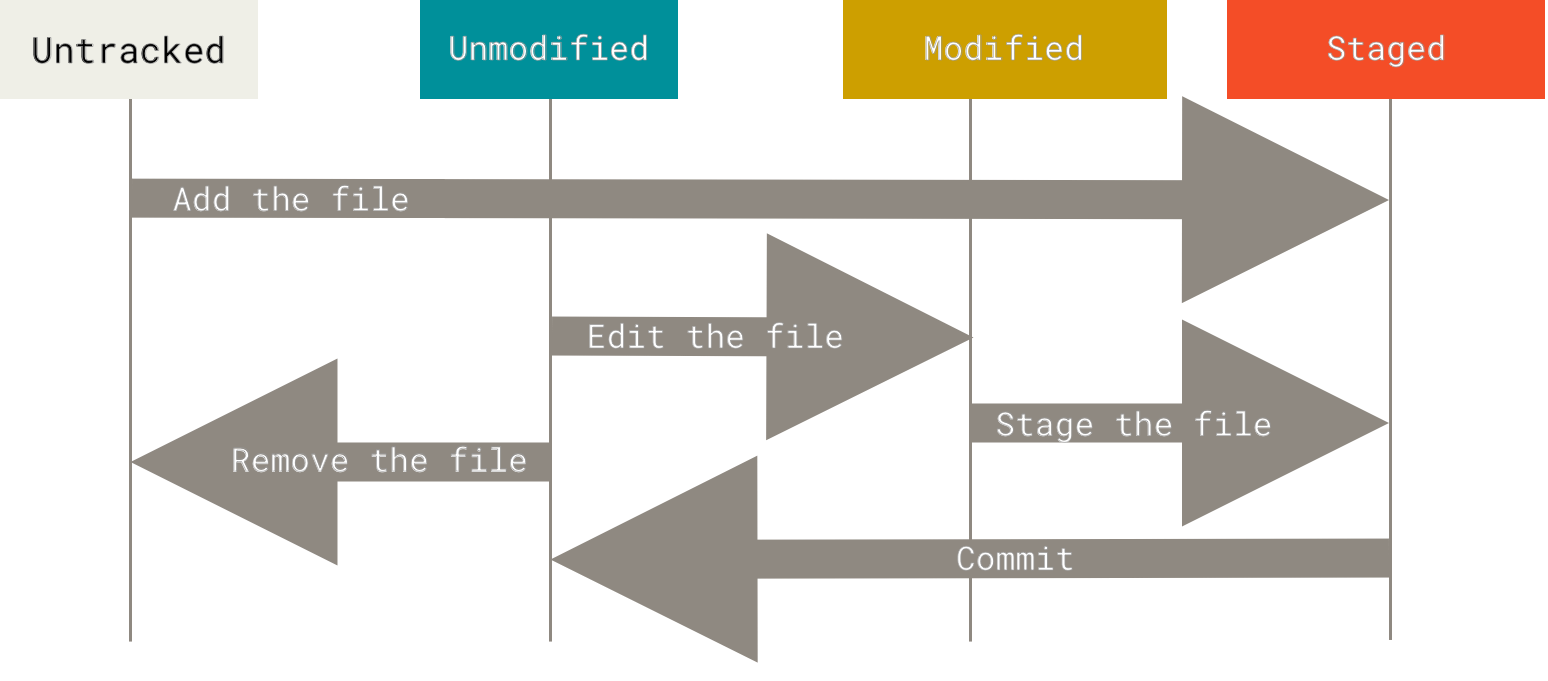
1. Untracked :-
Untracked files are everything else — any files in your working
directory that were not in your last snapshot and are not in your
staging area.
2. Unmodified :-
When you first clone a repository, all of your files will be tracked and unmodified because Git just checked them out and you haven’t edited anything.
3. Modified :-
If you do some changes in any file in unmodified state or you add a new file then this file go to in the modified state.
4. Staged :-
After doing changes file go to the Modified state and you have to use git add . or git add <file name> command do add this file in Staging Area.
You have first check file comes in staging area or not by git status command After file comes in Staging Area you have to commit that work which you have to done with a commit message.You can commit by git commit -m <message> command.
You can easily Download GIT by git official website, click here.After Download press Windows + R and type cmd and enter , after opeming cmd type git --version command, if you show git version your git is successfuly install in your system.
Hope this my git artcle you like it., if like it do a beautiful commant.Thank You ❤.


1 Comments
We are keep updating and making new git post, so thank you ❤ for your support.
ReplyDelete